
How to Make a Nutrition Facts Label for a Package – Download Free Nutrition Label Template Samples
- Jul, 08 2010
- By Clay
- Package Design, Tutorials for Beginners
- 65 comments
Wanna a Whole Lotta Label…
In a big hurry?
Download the Editable Nutrition Label File
Updated 4-20-12 with Even More Samples!
Now Backwards Compatible to Illustrator CS4!
Got more time? Then keep reading.
I remember making my first nutritional facts label. I didn’t know where to start so I started in the kitchen. I picked out a similar food to see how someone else did it. I figured if a major food company was doing it like that, then I could too.
It didn’t look that hard – fonts were Helvetica or Arial and you just put things in columns with alternating thick and thin horizontal lines – pretty basic stuff. And it really wasn’t that hard, until my clients gave me all sorts of unusual packages and even more unusual products that needed some kick-ass product packaging.
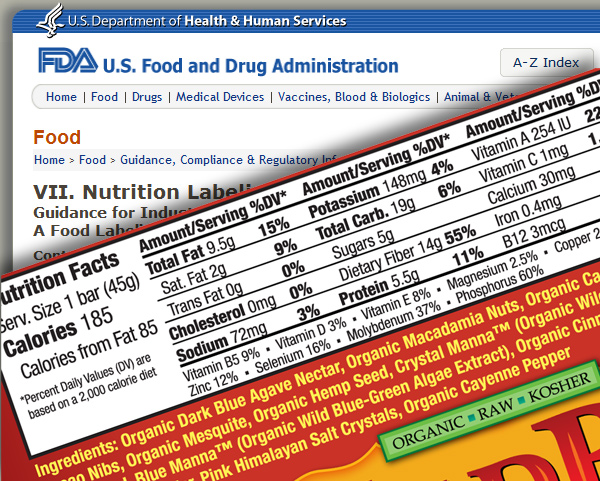
I started learning about what the FDA says you can and cannot do as well as utilizing their excellent samples to match just about any design problem. The FDA has really done their homework on this one. They make it really easy to adapt their recommendations to just about any packaging challenge.
So now I’m sharing what I’ve learned and providing you this Illustrator editable vector PDF nutritional label template sample pack to get you started. All of these labels were taken from product packages that I designed and are currently on the market so I know they work. They cover the four basic types of nutrition label challenges – the “small overloaded label”, the “we don’t need to put everything in just the basics”, the “we have no more room so just make it fit somehow” and the “our package is so big that the FDA requires us to put everything…even spelling out the word saturated instead of using an abbreviation”.
Download the Nutrition Label File
The samples were taken from WildBar , GourmetMist and DoGoodie brownies.
Helpful Resources
Cool Free Online Nutritional Panel Generator
Note: After generating the panel save page as PDF (you do this by printing the page and then choosing PDF from the drop down menu of available printers). The file will be editable in Illustrator except for the heading (a bitmap image) which you will need to replace. The program also automatically generates the DV percentages based upon a 2,000 calorie diet. Sweet!
Great FREE Editable Nutrition Facts Label Template
This one may even be better than mine because it has detailed specs and justifications on why you do what you do.
This one is provided by Walle Packaging.
FDA Nutritional Labeling Guidelines
Don’t make a nutritional panel without it.
USDA National Nutrient Database
Nutrient profiles for nearly every food in the world.
File Under: Learn About FDA Nutrition Facts Label Requirements – How to Design a Nutrition Facts Label – Creating a Nutrition Facts Label – Free PDF Illustrator Nutrition Facts Label Template – Make a Nutrition Facts Table


kaya
very useful! thanx for sharing!
Mercedes
not what i needed. i need site that tels you how to make a nutrition label, not one that does it for you!
Clay (The BDD Dude)
So I guess links to the FDA nutritional label guidelines, the FDA nutrient database to instantly generate nutritional profiles for any food in any amount down to a single gram, plus an editable PDF file with three different templates to use isn’t enough? Other than a psychic link that spoons feeds my knowledge directly into your brain I don’t know what else would help you.
Da Man
Thanks!
The psychic spoon worked just fine for me.
Wow, so much easier than actually reading…
Kirsten
Ha!
ana
I am trying to download the illustrator editable document …… but am only being able to access the a jpg am i doing something wrong? Help this is exactly what i need!
Heather
I must be doing something wrong, or jsut don’t quite get it. I can’t figure out how to get the border and thick lines to paste into my document. Am I meant to get those, or do I have to figure out how to create them? I tried some of the other links,but couldn’t get the snipping tool, and had the same sort of issue with those other programs, in not getting the border, etc.
Thanks so much,
Heather
Clay (The BDD Dude)
I suspect you aren’t using Illustrator. These are illustrator editable PDF files. What program are you trying to use?
Heather
Oh, I see (we emailed a bit offline), yes, I don’t have Illustrator, which I wasn’t even experienced enough to realize, so of course I can’t edit it, DUH! Thanks for your patience. I did cobble something together with WORD (wow, THAT was time-consuming) which is not completely up to snuff, but is working for my purposes for now…
Thanks again
Christopher
Thank you so much, Clay!
However, I too am not able to copy/paste the entire vector into illustrator. I DO have Adobe Illustrator CS5.
Do you happen to know why I can only copy the text, and not the actual structure of the nutritional labels?
Thank you in advance for any assistance.
Christopher
Clay (The BDD Dude)
You need to download the file and then open it in Illustrator. It’s an illustrator editable PDF – meaning it’s actually no different than an AI file as far as Illustrator is concerned.
Christopher
Worked!
Thank you so much!
It took several steps to open it in Illustrator which were not obvious to me:
1) When the Adobe Reader file opens (after clicking the link),
save it to Desktop
2) Right click on the icon and ‘Open with’… (Choose a Program)
3) ‘Browse’ to add Adobe Illustrator to the list of programs
available to open things with
4) Open it with Illustrator
I’m new to this. The vectors are exactly what I needed.
Thanks again for the help and for your patience with the repeat question.
Cheers.
Clay (The BDD Dude)
Great. You also just downloaded the updated PDF file. I added another nutrition panel style and also made it easier to edit.
Here’s two other methods of saving and opening:
Click link to open in browser then save to desktop (or folder of your choice). Then open Illustrator and choose “File > Open” and then open it directly in Illustrator
or
Right click hyperlink to PDF and choose “save link as”. Save to folder of your choice. Open Illustrator, then open PDF file.
Erik
Hey Clay, thanks for the file, just what the doctor ordered. But, I too am a bit miffed that when I opened it, it didn’t already have my logo and nutritional data in it…what’s up with that? …kidding. Can’t please everybody I suppose :)
Clay (The BDD Dude)
Thanks. Your comment brightened my day.
Andrea
Thanks for sharing, this is just what I needed for a new project.
ryan lail
what is the cross on the nutrition fact lables
Clay (The BDD Dude)
Not sure what you mean. I double checked and didn’t see a cross anywhere. Please explain.
Matt
What you really need for this process is a client who doesn’t keep changing the values over and over again ;)
Austin
I don’t see a cross but I do see Mary…weeping. Thanks for the valuable information.
said
hello there,i would like edit & print the fda approved nutration table.
i tried to edit on this site,but i couldn’t.pls help me on that.
thanx
Clay (The BDD Dude)
I’ll say this one more time. The file is an Illustrator editable PDF file. You need Illustrator to edit it.
Tim
I don’t have illustrator, only adobe photoshop. Anyway I can open this in photoshop and still have it be editable? I tried to no avail… could you make it in photoshop format in future? Any open source software that can open this in editable format? thanks!
Clay Butler
I don’t think there’s anyway to make this file editable in Photoshop. But I also won’t be making a Photoshop version because you shouldn’t be using Photoshop for print layouts. Photoshop should only be used for editing images, web design or digital painting.
Lydia
This was a great tool! I printed out nutrition labels in about 2 minutes, and they look very professional. Thanks!
Scott
FYI… for Canadians who may have found this blog, here’s the Canadian page about food labelling and regulations:
http://www.inspection.gc.ca/english/fssa/labeti/guide/toce.shtml
Jacqui
Thank you! Helped a lot today to jam out a nice package design.
Katherine
Thank you Clay, this is very helpful!
Brett
Thanks for the info. Was about to throw in the towel and take up ditch-digging…
brian
hi i want to make a nutritional label for a dry pastry mix but also to include the “prepared” nutritionals as well. do you have any tips or software for this? thanks, brian
Clay (The BDD Dude)
What you do for prepared nutritionals is you just create another column of percentages. In the top you put “Dry Mix” and then a few spaces over you put “As Prepared”. So the panel is all the same it just has two columns of percentages. You don’t need to put additional info about the grams of fat, carbs, etc. for the prepared column. Go check out the muffin/cupcake/cake isle of the grocery store and you’ll see.
Emmanuel
Thank you! Your blog is awesome!
Tyler
Clay, just wanted to let you know I have thoroughly enjoyed reading through this blog. I used to work tech support so I know where your coming from in having to repeat the same answer to the same question over and over. Anyway, didn’t have a problem with the file everything seemed to work perfectly. Just figured I’d let you know I got a good kick out of reading this.
Desirae Hill
Wow, nice work. I’ve been going back and forth with my design team and as a novice package designer, I must say this is great. (It’s amazing how much criticism can be incited by doing something helpful.) Thank you, way to share the love!
Clay Butler
Yeah, it’s kind of funny. There’s only two people in the world who have taken the time to create and distribute editable, vector, print quality, nutrition panels and one of them is me. And it’s free! What more could you ask for. The FDA themselves don’t even provide these files.
Todd
Do you know of a free program that does the nutrition information from a recipe. I can do the labels from your info, but need to figure out the values.
Clay Butler
No free programs but this software makes nutritional panels based upon recipes. See Shop n Cook Pro. If you want to hire a company to generate nutrition profiles based upon ingredients or analyzing the actual product Brooker Laboratories does a good job.
Todd
Thanks for doing all of this
Debra
THANK YOU!! What a time and money saver!
Inspired
Hi… I have a client I am producing labels for (US market) and they haven’t supplied the nutrition details in a table, just a list.. however, the label sizes are only 4.25″ x 3.25″ and sp much to go on them! …I’ve not had to create these things before.. what do you suggest?
Clay Butler
Download my template file and use the smallest sample on there and swap out the values.
Jessica
Thanks so much! this is awesome!!! You did a great job putting all this info. together, I couldn’t ask for more. Thanks again! :)
Anniepg
Hi Clay, I imported the file into Corel Draw and it changed fonts and some characteristics, but it is editable. This does help me to have a starting place so I don’t have to reinvent the wheel. Thands so much.
Anniepg
Oops, I meant Thanks so much.
MichelleG
Thanks so much for sharing this!
Nancy
Thank you. Now I just need to figure out how to work illustrator!
dameDonna
This is awesome! Thank you for sharing your hard work with fellow designers.
I’m sorry you’re getting flack from some. It’s not only easy to use, but done in the correct program! I cannot stand getting templates that are only in Word (or other programs not made for design layouts). As a long-time designer that is having to tackle food packaging for the first time, these are perfect!
Mara King
thank you so much for this valuable information. this is so great not only for a designer but also for the small business owner who is putting it all together on a shoestring. massive thanks!
Lina
Thank you so much! This was very helpful. I do not have much experience on Illustrator and still was able to manage.
Thanks again.
Amy
Thank you! Thank you! Thank you! This is my new favorite blog. I was so nervous to transition from student projects to paying clients but all the fantastic articles on your site helped me navigate this unknown territory and sound way more experienced than I really am. You have saved me so much time, energy, and sanity. Have you ever done a supplement label?
Clay Butler
Yes. You can see an example here: http://www.claytowne.com/beats-digging-ditches/branding-design/product-package-design/product-package-design-for-oasis-energy-drink/
Claudia
Thanks so much for putting all this together. I am creating a label for my father in law’s hot pepper sauce and came across your site when looking for design guidelines. What a resource! Can’t wait to peruse the rest of your site.
And I must say, as a prepress production/graphic artist, your comment above made my day; “I don’t think there’s anyway to make this file editable in Photoshop. But I also won’t be making a Photoshop version because you shouldn’t be using Photoshop for print layouts. Photoshop should only be used for editing images, web design or digital painting.”
Ugh… :)
Clay Butler
The Photoshop addiction is a tough one to break. Once a designer does though, they’ll wonder why they ever thought Photoshop for print work was a good idea.
Rachel
I’m so impressed; thanks so very much for this comprehensive, easy-to-use resource.
But, you already had me at “Beats Digging Ditches”.
Thanks Clay! :] Consider thee bookmarked.
Shamal
Great template. I’m having an font issue though, as Illustrator says the Helvetica fonts used can’t be found on my mac. They are all listed in Font Book, but Illustrator (CS5) is being fussy. Please help.
Clay Butler
Sorry, but I don’t use a Mac so I don’t have any insights on this one.
Luane
My food line is too small in volume to need a nutritional panel. I need to make an ingredient only list for my products. Do you know of any templates for that?
(Your info is awesome, by the way.)
gerstley
I am using AI CS6 on Windows and when I open the PDF it tells me the fonts are not found. The templates come out looking different. Am I doing something wrong?
Clay Butler
That’s because you don’t have those fonts installed. I included the names of the fonts so you could acquire them and install them. They are basic fonts that every designer should have so this would be a good time to get them. I can’t imagine a life without such a foundation font as Helvetica.
Nirasha
Thank you so much sharing.
Jen
Thank you so much for sharing. I’ve been looking for examples of the little tiny package labels. The other NFTs i could get from the FDA. Very much appreciated.
Anna Seago
Hi Clay, we have all our nutrition information for about 1000 products on an excel spreadsheet. Is there a way to “merge” or “import” the file so we don’t have to retype all the information?
Clay Butler
I don’t know of any program that can do that. The products from Shop-n-cook might though. (see: http://www.shopncook.com/compare.html)
Diego Hemken
Thanks! I’m attempting to make a business plan for a product idea. It’s a long shot for me, and this helps! I’ll try to remember to show you the label I come up with.
http://botokstudio.pl
Whenever are walking then you breathe better. Sufficiently good
mulch in your garden does the actual lot to cut back down on
the water use.